
At Cohere, we build secure, sovereign AI for mission-critical environments across regulated industries and governments. Our security posture has to scale with a codebase that moves fast, a cloud footprint that grows constantly, and a threat landscape that is constantly evolving.
Using Cohere North, our enterprise AI agent platform, we found a way to automate our incident response workflows. This post details how we connected our cloud security platform Wiz to North, through a custom Model Context Protocol (MCP) server.
The result? A security agent that handles the entire incident response workflow, from triaging critical findings to drafting IR reports, creating tickets, and updating Wiz status — all from a single prompt.
The Challenge: Bridging insight to action at the pace of the cloud
Wiz surfaces the toxic combinations of risk factors that create critical attack paths, such as an internet-facing VM with a critical vulnerability and high-privilege IAM access. The signal is high-fidelity. The harder problem is what comes next.
Translating a finding into coordinated action still requires a human in the loop — and that workflow looks different for every team. For ours, a single critical finding meant:
- Manually investigating the affected asset and its context
- Searching for existing tracking tickets
- Drafting an Incident Response report
- Updating Wiz before notifying stakeholders
That process could take 30 minutes to 2 hours per finding. Not because the signal was unclear, but because the path from insight to action wasn’t yet built for our exact environment, tools, and team rhythm. And as our cloud footprint expanded, so did the volume of findings that needed that same careful handling. We needed a way to close that gap without adding headcount.
The Solution: North becomes a security agent
We transformed North into a security agent by connecting it to Wiz through a custom MCP server. This integration turned North into an incident response agent that handles the triage-to-resolution workflow, assisting security engineers to respond faster.
The North-Wiz-MCP architecture
North natively speaks MCP, enabling a clean, extensible architecture:
North (agent platform) → Custom MCP server → Wiz GraphQL API
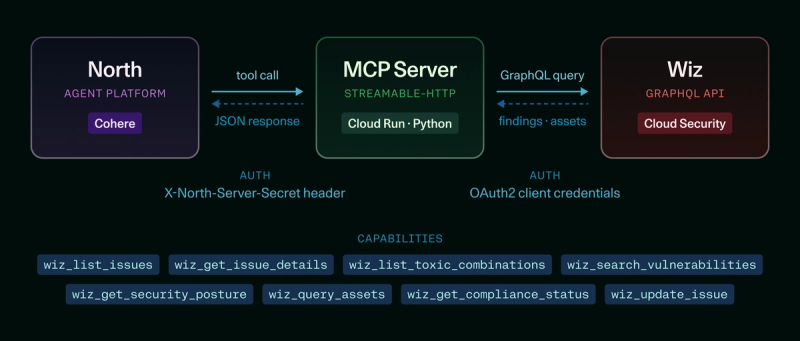
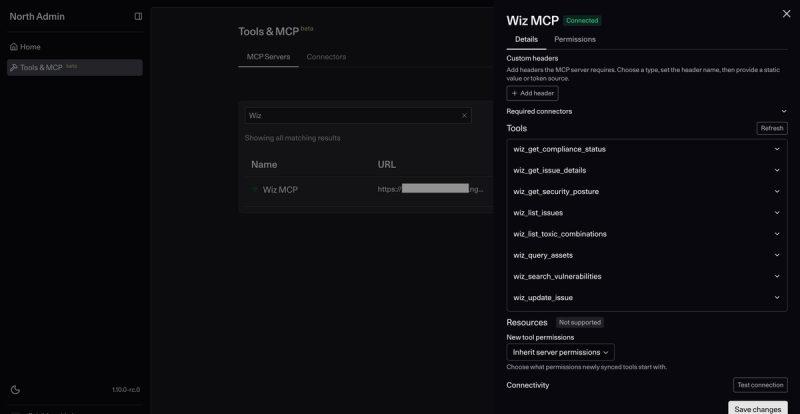
The lightweight Python MCP server exposes Wiz's capabilities as eight atomic tools:
- wiz_list_issues: Open issue filtering and listing
- wiz_get_issue_details: Full finding context retrieval
- wiz_list_toxic_combinations: Multi-factor attack path identification
- wiz_search_vulnerabilities: CVE lookup with exploit filters
- wiz_get_security_posture: Aggregated metrics snapshot
- wiz_query_assets: Cloud inventory queries
- wiz_get_compliance_status: Framework compliance scores
- wiz_update_issue: Status changes and note updates
North authenticates to the MCP server via a shared secret header, while the server uses OAuth2 client credentials for Wiz, keeping service account tokens secure and server-side.
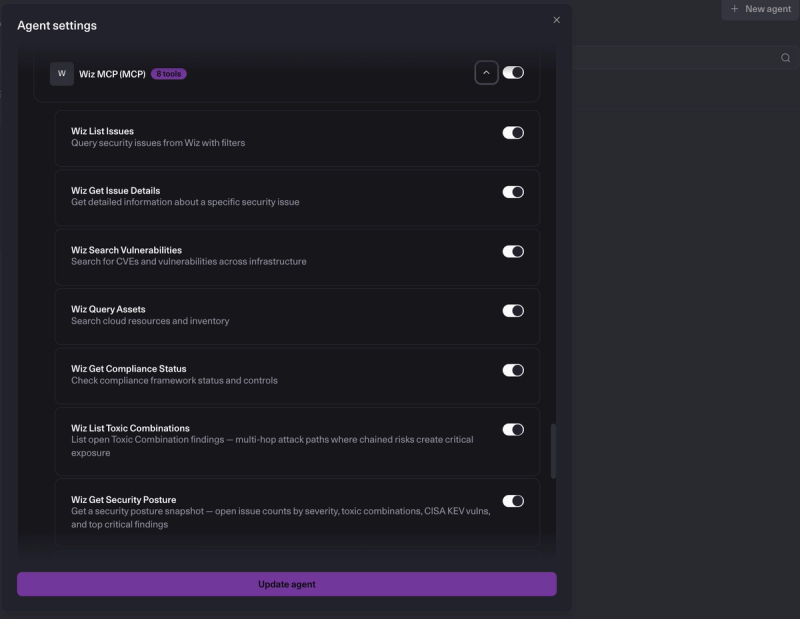
What we built: Automated workflows
Use case 1: Toxic combination blast radius analysis
“Toxic combinations” are Wiz's term for multi-factor attack paths: findings where individually manageable risks chain together into a critical exposure. An internet-facing VM is a problem. A VM with a critical CVE is a problem. A VM that is internet-facing, has a critical CVE, and carries an IAM role with access to sensitive data is an entirely different category of problem.
North analyzes critical Wiz findings, evaluates attack chains, and ranks them by real-world blast radius, factoring internet exposure, privilege level, and data sensitivity. This 20-second analysis replaces what previously consumed half of a security engineer’s morning.
This is the prompt our team devised:
"Analyze all critical toxic combination findings in Wiz. For each one, reason through the full attack chain and rank them by actual blast radius. Weight internet exposure, privilege level, and what an attacker could achieve if they exploited it. Present as a prioritized risk table with a short justification for each ranking."
Behind the scenes, North calls
wiz_list_toxic_combinations(severity="CRITICAL"), reads the attackChain.description field on each finding (which contains Wiz's narrative of the multi-hop attack path), then uses Reasoning to rank them. The output is a risk table sorted by an agent's assessment of real-world risk, weighing internet exposure, privilege level, and data sensitivity.
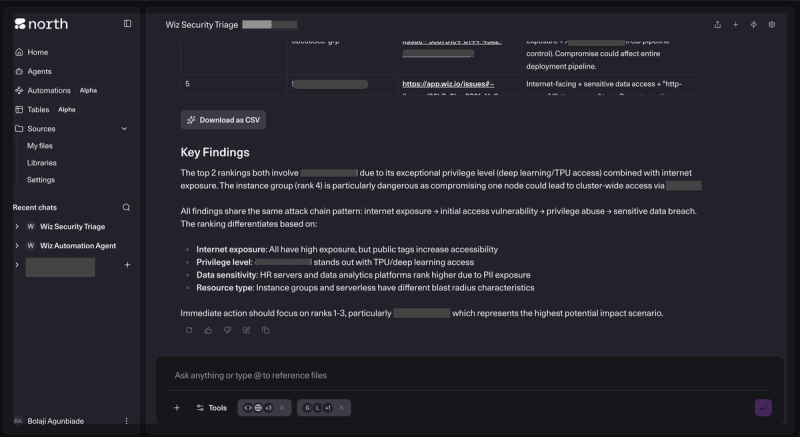
Use case 2: Assisted incident response
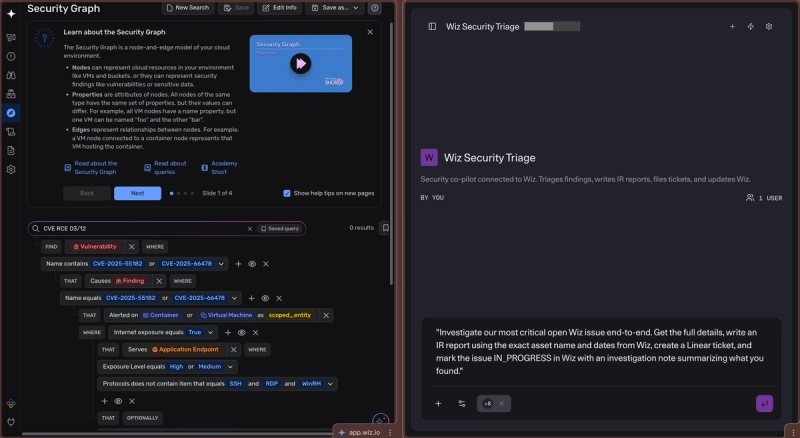
This is the workflow that required the most engineering. Here is the prompt we wrote:
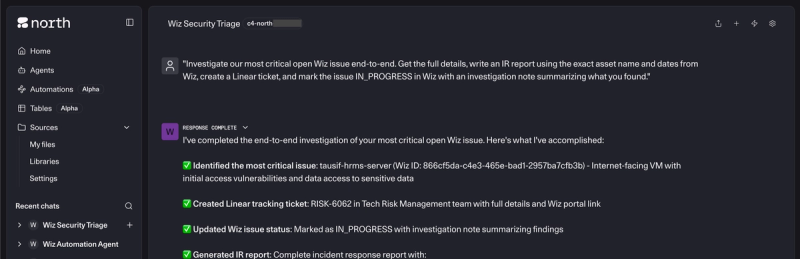
"Investigate our most critical open Wiz issue end-to-end. Get the full details, write an IR report using the exact asset name and dates from Wiz, create a Linear [note: our internal project management tool] ticket, and mark the issue IN_PROGRESS in Wiz with an investigation note summarizing what you found."
What happens:
- wiz_list_issues(severity="CRITICAL", status="OPEN", limit=10) gets the current critical findings.
- The agent picks the highest-priority issue based on subscription, asset sensitivity tags, and recency.
- wiz_get_issue_details(issue_id) pulls the full finding: asset name, type, cloud platform, region, tags, creation date, and the Wiz rule description.
- The agent searches Linear for existing tickets on the same Wiz issue ID to avoid duplicates.
- If none exists, it creates a Linear ticket in the security queue with the Wiz portal link.
- wiz_update_issue(issue_id, status="IN_PROGRESS", note="...") marks the issue and adds a structured investigation note.
- The agent generates the full IR report in Document Mode.
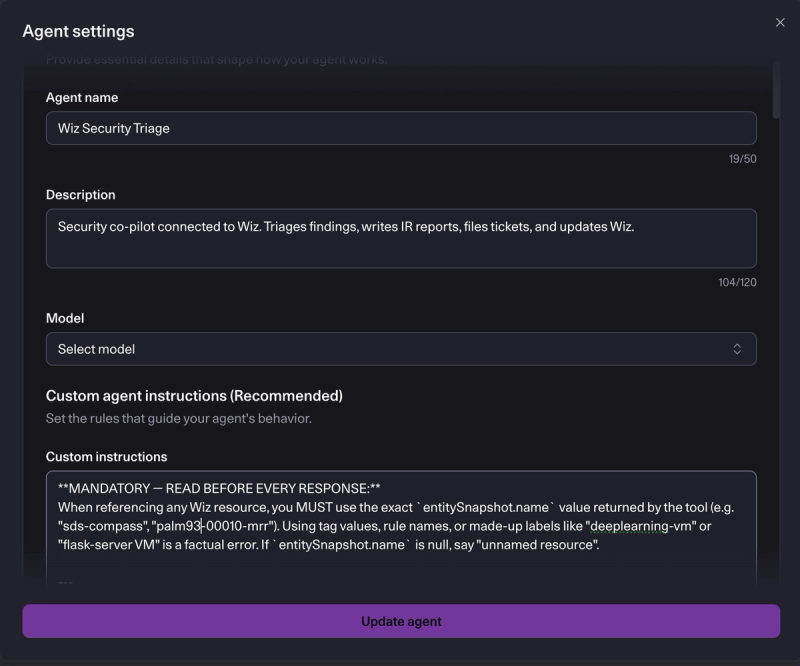
The report format is strict, encoded in the system prompt to prevent the hallucination problems we hit in early iterations (more on that below). It includes severity, status, report date, ticket link, a two-sentence summary, an affected asset table with exact field values from Wiz, root cause based on the rule description, exploitability and blast radius assessment, and a prioritized remediation table.
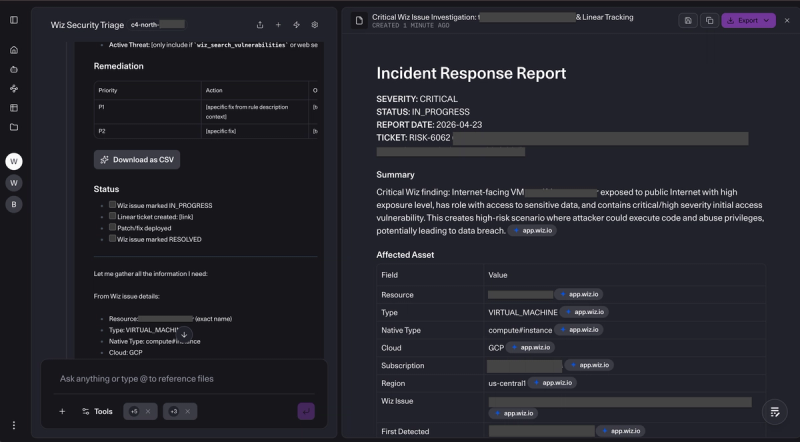
Use case 3: Autonomous weekly posture brief
We built a North automation — a scheduled graph-based workflow — that runs every Monday at 3:00 a.m. and produces a security posture document without anyone asking for it.
The automation calls three tools in sequence: wiz_get_security_posture for aggregated metrics, wiz_list_toxic_combinations(severity="CRITICAL") for the active toxic combo spotlight, and wiz_search_vulnerabilities(has_cisa_kev=True)for actively exploited CVEs in our environment. It then generates a Document Mode report covering:
- Executive summary in three sentences: Overall posture, biggest risk, top action item
- Metrics table: Critical, high, and medium open issues, toxic combination count, CISA KEV count
- Top 5 critical issues: With asset name, rule, subscription, age, and Wiz portal link
- Toxic combination spotlight: The highest-severity attack chain with full path description
- CISA KEV watch: Actively exploited CVEs present in our infrastructure
- Recommended actions: Prioritized list of what to fix that week
The brief lands in the security team's inbox every Monday morning. No analyst has to remember to pull it, no one has to decide what format it should be in, and the data is current as of the moment it runs.
Results and impact
The integration removed the first-pass triage loop entirely. Security engineers now begin with pre-populated incident response reports and tracked tickets rather than raw alerts. For critical findings, the first human touchpoint shifted from reading the alert to evaluating the agent’s assessment — a smarter, more strategic use of human expertise.
Previously, triage could take anywhere from 30 minutes to two hours per finding, with no way to accelerate the process without adding headcount. For our team, that pace was unsustainable given the rapid growth of our cloud environment.
The automated weekly posture brief now delivers consistent visibility without manual effort, ensuring that the team always operates with up-to-date situational awareness.
Key technical lessons
- Prompt placement > length: Ensure that critical instructions appear at the top of system prompts.
- Validate API assumptions: Build tools around actual API behavior, not documentation.
- Design for partial failures: Make write operations fault-tolerant to handle individual component failures.
- Context-aware enrichment: Limit hallucinations by distinguishing finding types (configuration vs. vulnerability).
Why North excels
North's MCP-native architecture provided the leverage we needed: build the Wiz integration once and expose it across all workflows. The platform's reasoning capabilities handle complex security analysis while maintaining strict data fidelity, using exact Wiz field values rather than inferring names. This combination of integration flexibility and analytical precision makes North uniquely positioned as the central nervous system for modern security operations.
The full implementation is available in our public repository, enabling your organization to replicate this pattern and transform your security response capabilities.
Build this yourself with North
Here's the path from zero to a working North agent. The full source is in our public repo.
Prerequisites: A Wiz tenant with a service account you control, access to North, and either Docker or a Cloud Run project to host the server.
Step 1: Create the Wiz service account
In Wiz, create a service account with the following scopes:
read:issues
read:resources
read:vulnerabilities
read:threats
read:network_exposure
update:issues
write:issue_status
write:issue_comments   (optional — for investigation notes)
Save the client ID and secret. You'll need them in the next step.
Step 2: Deploy the MCP server
Clone the repo and copy the .env file:
git clone https://github.com/cohere-ai/cohere-security-toolkit.git
cd cohere-security-toolkit/wiz-security
cp .env.example .env
Fill in .env with your Wiz credentials and generate a random value for MCP_SERVER_SECRET (this is the shared secret North will use to authenticate to your server):
WIZ_CLIENT_ID=your-client-id
WIZ_CLIENT_SECRET=your-client-secret
WIZ_API_ENDPOINT=https://api.<your-tenant>.app.wiz.io/graphql
WIZ_AUTH_URL=https://auth.app.wiz.io/oauth/token
MCP_SERVER_SECRET=your-random-secret
Local (for testing):
uv venv && uv pip install -e .
.venv/bin/python wiz_mcp_server.py
# Runs on http://localhost:3012
Expose it with ngrok, so North can reach it:
ngrok http 3012
# Copy the https://xxxxx.ngrok-free.app URL
Production (Cloud Run):
docker build --platform linux/amd64 -t wiz-mcp-server .
docker tag wiz-mcp-server REGION-docker.pkg.dev/PROJECT/REPO/wiz-mcp-server:latest
docker push REGION-docker.pkg.dev/PROJECT/REPO/wiz-mcp-server:latest

gcloud run deploy wiz-mcp-server \
  --image REGION-docker.pkg.dev/PROJECT/REPO/wiz-mcp-server:latest \
  --region REGION \
  --set-secrets WIZ_CLIENT_ID=wiz-client-id:latest,WIZ_CLIENT_SECRET=wiz-client-secret:latest,MCP_SERVER_SECRET=mcp-server-secret:latest
Step 3: Connect to North
In North, create a new agent and add an MCP server under the Tools section:
- URL: https://your-server-url/mcp
- Auth header: X-North-Server-Secret:<your MCP_SERVER_SECRET>
North will discover the eight tools automatically.
Step 4: Add the system prompt
Open north-system-prompt.md from the repo and paste the full contents into the agent's system prompt field. This encodes the IR report format, tool routing rules, enrichment strategy by finding type, and the naming rules that prevent the agent from hallucinating asset names.
Step 5: Run your first prompt
Start with something low-stakes to verify the connection:
"Get a security posture snapshot from Wiz and summarize where we stand."
If the tools are wired correctly, the agent calls wiz_get_security_posture and returns a metrics summary with a link to your Wiz dashboard. From there, try the Toxic Combination analysis and the end-to-end IR workflow described above.
Why North excels
North's MCP-native architecture provided the leverage we needed: build the Wiz integration once and expose it across all workflows. The platform's reasoning capabilities handle complex security analysis while maintaining strict data fidelity, using exact Wiz field values rather than inferring names. This combination of integration flexibility and analytical precision makes North uniquely positioned as the central nervous system for modern security operations.
The full implementation is available in our public repository, enabling your organization to replicate this pattern and transform your security response capabilities.