





Embed 5 and Rerank 5 are now live on OpenRouter. Here’s how to turn them into a working RAG pipeline in a few dozen lines of Python code through a single API.
There are Cohere’s most powerful retrieval models yet, delivering leading performance on enterprise documents and complex retrieval tasks. If you’re already using OpenRouter, you can get started immediately - using the same API key and credits as your existing models, with no additional setup.
RAG grounds an LLM's answer in your own data by fetching relevant chunks before it writes. Embedding search provides a fast and effective first-stage approximation. A reranker then reads the query and each candidate together, adding precision to what’s been retrieved.
Two features of the Cohere models shape this design:
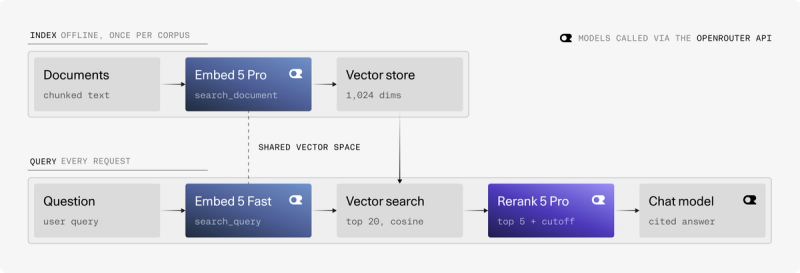
- Embed 5 Pro and Fast share one embedding space. Index with
embed-5-profor quality, then query withembed-5-fastfor latency. - Rerank 5 scores are calibrated. A score means the same thing across queries and domains, so one relevance threshold can filter out weak context before it reaches the LLM.
By the end you'll have a short Python script that answers questions over your docs with scored citations. This same approach can be applied to virtually any retrieval use case, from enterprise search and customer support to knowledge management and document discovery.
Setup
You’ll need Python 3.10 or newer, an OpenRouter API key, the OpenRouter Python SDK, and NumPy for an in-memory vector store.
Embed 5 returns Matryoshka vectors at six sizes, 2048 by default. We suggest 1,024-dim int8 vectors as the best quality-to-cost point; OpenRouter's embeddings API returns floats, so this post uses 1,024-dim floats.
The NumPy store keeps this demo simple. For production, replace it with your preferred vector database, such as pgvector, Qdrant, Pinecone, or Weaviate.
Indexing
Indexing turns each chunk of text into a vector, a list of numbers where similar meanings sit close together. It runs once per corpus, so it's the step where the highest-quality model pays off.
Split each document into chunks, embed them with Embed 5 Pro as search_document, and normalize the vectors so a dot product equals cosine similarity.
The sample corpus is a fictional API's docs, with a few near-misses on purpose:
Three key details to point out:
input_type:tells Embed 5 which side of the search a text is on. OpenRouter passes it through to Cohere.- Batching: sends many chunks per request, which cuts round trips and speeds up indexing. It doesn't change the cost, since embeddings are priced per token.
- Chunk size: packing whole paragraphs follows the by-paragraph strategy in OpenRouter's guide, and 1,500 characters is roughly 300–400 tokens of English. Embed 5 accepts up to 128k tokens, but every chunk also goes through Rerank 5, which reads up to 32k tokens of query and chunk combined and splits anything longer into several passes.
Retrieval
Retrieval finds the chunks whose vectors sit closest to the question's vector. This acts as a representation of semantic similarity between the two pieces of content.
Embed the question with Embed 5 Fast as search_query, then pull a wide candidate set of 20 chunks by cosine similarity.
Querying a Pro-built index with Fast works because the two models share an embedding space, as long as both sides use the same dimensions. It's the split we recommend: in Cohere's tests across 40 datasets, Fast queries on a Pro index kept 98.4% of all-Pro retrieval quality, against 96.6% for Fast on both sides. With any other model family, you’d have to use the same model on both sides.
Let’s cast a wide net at this stage: recall is the retriever's job, precision is Rerank’s. OpenRouter's guide suggests 10–20 candidates feeding a top 3–5 rerank.
Reranking
Reranking re-scores the shortlist by reading the question and each chunk together. That's too slow to run over a whole index but more accurate than vector similarity, so it runs only on the top candidates. Rerank doesn’t require Embed - or any embedding model. It works as a simple second stage with your existing semantic, keyword, or hybrid search system.
Send the query and the 20 candidates to Rerank 5, keep the top 5, and drop anything under a relevance threshold.
Each result carries the candidate's position in your list (index) and a relevance_score, per the rerank response schema.
What Rerank 5 adds at this step:
- Calibrated scores. Scores stay consistent across queries and domains, so a single
MIN_SCOREdecides what reaches the LLM. - 32k-token context. Long chunks are scored whole.
- Semi-structured data. JSON records and tables rerank well when formatted as YAML strings.
- No re-indexing to upgrade. Rerank reads raw text at query time, so switching models is a one-line change.
Use rerank-5-pro for reasoning-heavy queries and long or domain-specific documents. Use rerank-5-fast for high-volume search and agents that search many times per task. One thing to note: Rerank 5 is text-only, but will work for parsed pdfs.
Generation
Generation hands the best chunks to an LLM as numbered sources and asks it to answer from those alone. That keeps answers grounded in your docs and gives readers citations they can check. If nothing clears the threshold, skip the LLM call entirely.
Sending each chunk's title with its text lets the model cite something readable; add URLs too if your docs have them. OpenRouter's guide uses the Responses API for this step instead. To follow it, call client.responses.send with the system prompt as instructions and the sources and question as input, then read the answer from the message item in res.output rather than from choices.
Results
Here we’ll validate whether the steps we implemented improved our responses.
Reranking earns its extra call when it confidently picks the right chunk and drops near-misses that embedding search ranks just below it.
| Rank | Embed 5 only | Embed 5 + Rerank 5 |
|---|---|---|
| 1 | Rotating API keys · 0.522 | Rotating API keys · 0.808 |
| 2 | Webhook signing secrets · 0.337 | below 0.3 cutoff |
| 3 | Creating API keys · 0.316 | below 0.3 cutoff |
Wrap-up
Everything in this pipeline ran through one API key and one client. Embed 5 Pro built the index, Embed 5 Fast and Rerank 5 handled each question, and a chat model wrote the answer, with no separate SDKs, accounts or bills to juggle.
That single surface is also what makes the pipeline easy to evolve. Every model is just a string, so trying rerank-5-fast instead of rerank-5-pro, or a different chat model, is a one-line change.
Start with the sample corpus, swap in your own docs, and see what Rerank 5 moves to the top.
Where to take it next:
- Hybrid search. Add keyword (BM25) hits beside the vector hits. Rerank reads raw text, so it scores both lists in one call.
- A smaller index. Drop to 512 or 256 dimensions, or use int8 or binary vectors through Cohere's own API.
- Images and PDFs. Embed 5 embeds images and mixed text-and-image inputs such as PDF pages, and OpenRouter's embeddings API accepts
image_urlcontent parts. Rerank 5 is text-only, so rerank those results on their text, such as parsed page text or captions, or skip reranking for them. - Evaluation. Label a small set of real queries, compare hit rate at 5 with and without rerank, and tune
MIN_SCOREon the same set. - Explore Compass. Cohere’s enterprise search and retrieval platform brings Embed and Rerank together in a single solution, making it easier to build powerful search and AI applications across enterprise data. Now available to cloud customers.